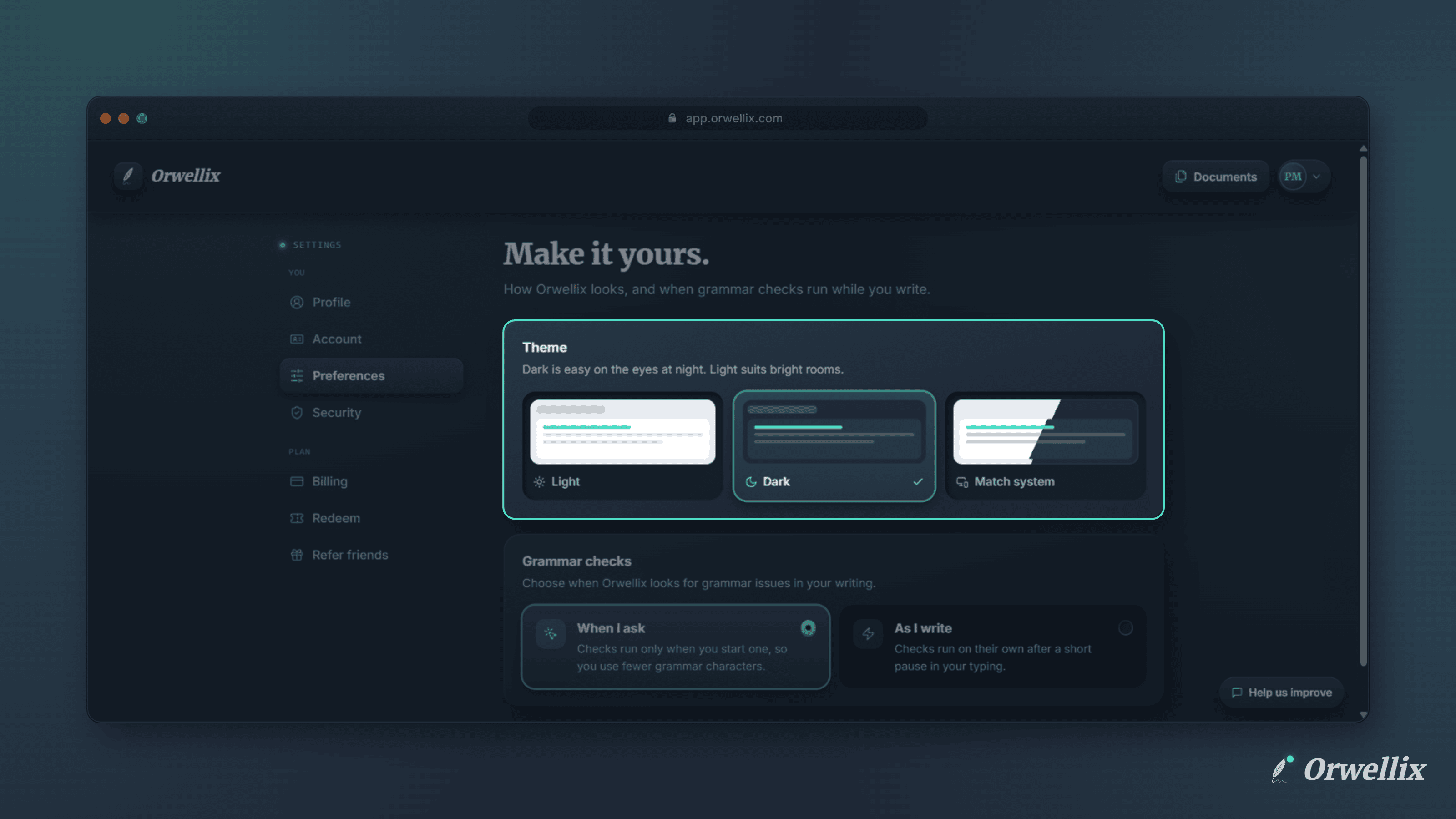
Long writing sessions are hard on the eyes, and the right screen depends on where you are. A dark screen is easier at night. A light one is easier to read in a bright room.
Orwellix now supports Dark mode and Light mode, and you can switch between them at any time.
Three Options
Go to Settings → Preferences and find the Theme section. You can choose:
- Light: A bright workspace for daytime and well-lit rooms.
- Dark: A low-glare workspace that’s easier on your eyes at night.
- Match system: Orwellix follows the light or dark setting on your computer or phone.
The change takes effect as soon as you pick it. There’s nothing to save and no page to reload.
Everywhere in Orwellix
The theme applies to the whole app, including the document editor, the writing-check panels, the AI assistant, your documents list, and Settings. New accounts start in Dark mode, and you can change it whenever you like.
Your Choice Follows You
Your theme is saved to your account, not just the browser. Sign in on another computer and Orwellix opens in the theme you picked. If you have Orwellix open in several tabs, changing the theme in one updates the others.
Downloads and printed pages always use black text on a white page, whatever theme you write in.
Try It Now
Open Settings → Preferences → Theme and choose Light, Dark, or Match system.