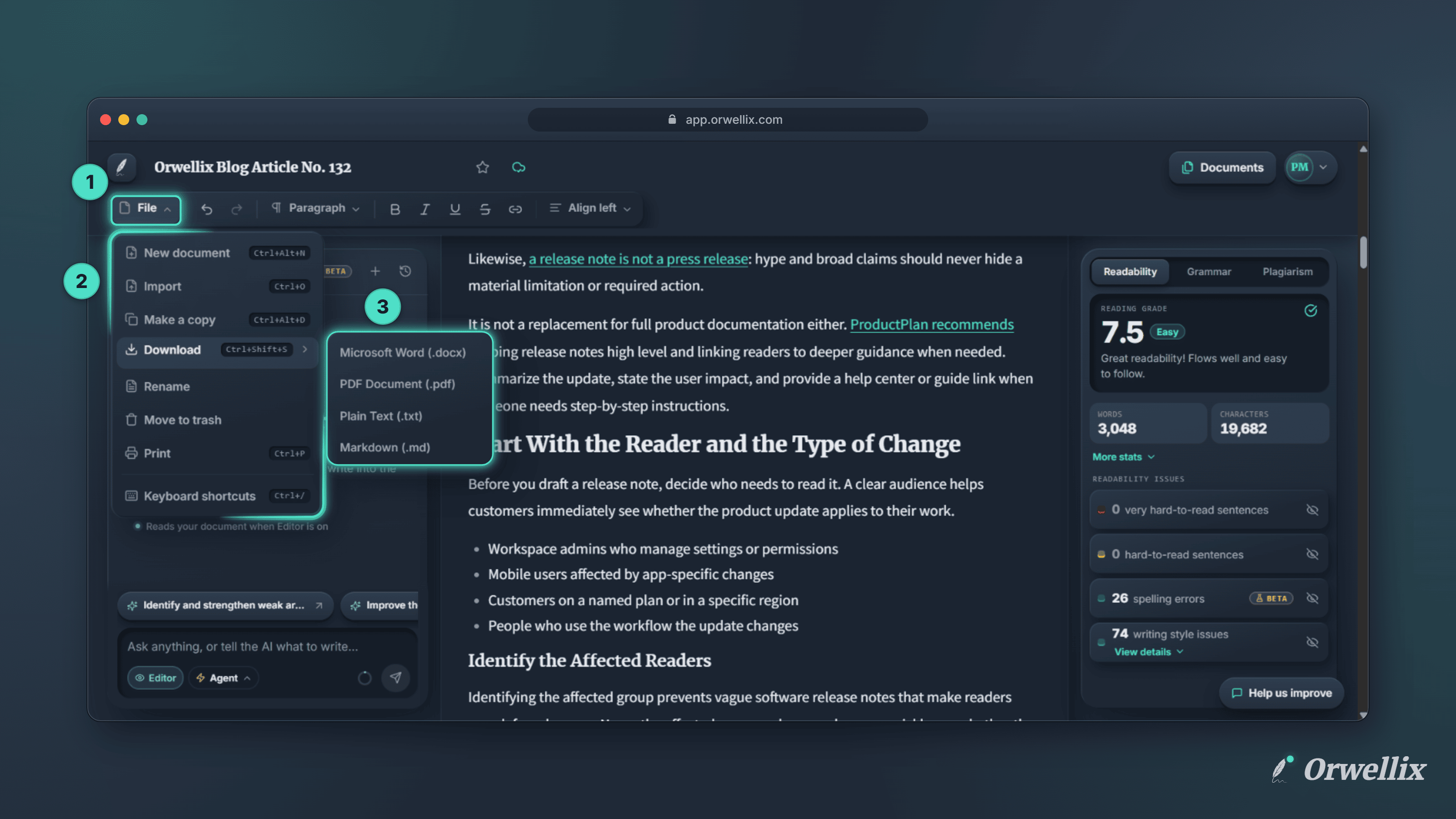
A finished draft usually has to go somewhere else. A client wants a Word file. A teacher wants a PDF. Your website or code repository wants Markdown.
You can now download any Orwellix document in four formats, straight from the editor.
Four Formats
| Format | Best for |
|---|---|
| Microsoft Word (.docx) | Sending to people who edit in Word or Google Docs |
| PDF Document (.pdf) | Sharing a final version that looks the same everywhere |
| Plain Text (.txt) | Pasting into any app with no formatting at all |
| Markdown (.md) | Websites, documentation, and code repositories |
How to Download
- Open File on the editor toolbar.
- Hover over Download and pick a format. The file saves to your computer right away.
You can also click Download itself, or press Ctrl+Shift+S (⌘⇧S on a Mac), to open a small chooser with the same four formats.
What Each Format Keeps
-
Word: Headings become real Word heading styles, so the navigation pane and table of contents work. Bold, italic, and underline are kept, and lists, quotes, and code blocks keep their indentation and layout.
-
PDF: Headings, bold, italic, underline, and strikethrough are kept, and links stay clickable. Lists and nested lists keep their bullets, numbers, and indentation, quotes are indented, and code blocks get a grey background.
-
Markdown: Headings, bold, italic, links, quotes, nested lists, and code blocks are converted to standard Markdown syntax.
-
Plain text: Just your words, with no formatting.
Writing-check highlights, such as readability and grammar markings, never appear in a downloaded file.
File Names and the Orwellix Footer
Each download is named after the document title, with - Orwellix added at the end. Characters that computers don’t allow in file names are removed. A document with no title downloads as document - Orwellix.
PDF and Word files have a thin footer on every page with Made in Orwellix · orwellix.com on the left and the page number on the right. The footer sits in the page margin, never in your text, so it doesn’t move or change your content. Markdown files end with a hidden note that doesn’t show when the file is displayed, and plain text files have no branding at all.
Downloads Are on Every Plan
Downloading works on every Orwellix plan, including Free. Open any document, click File → Download, and choose the format you need.