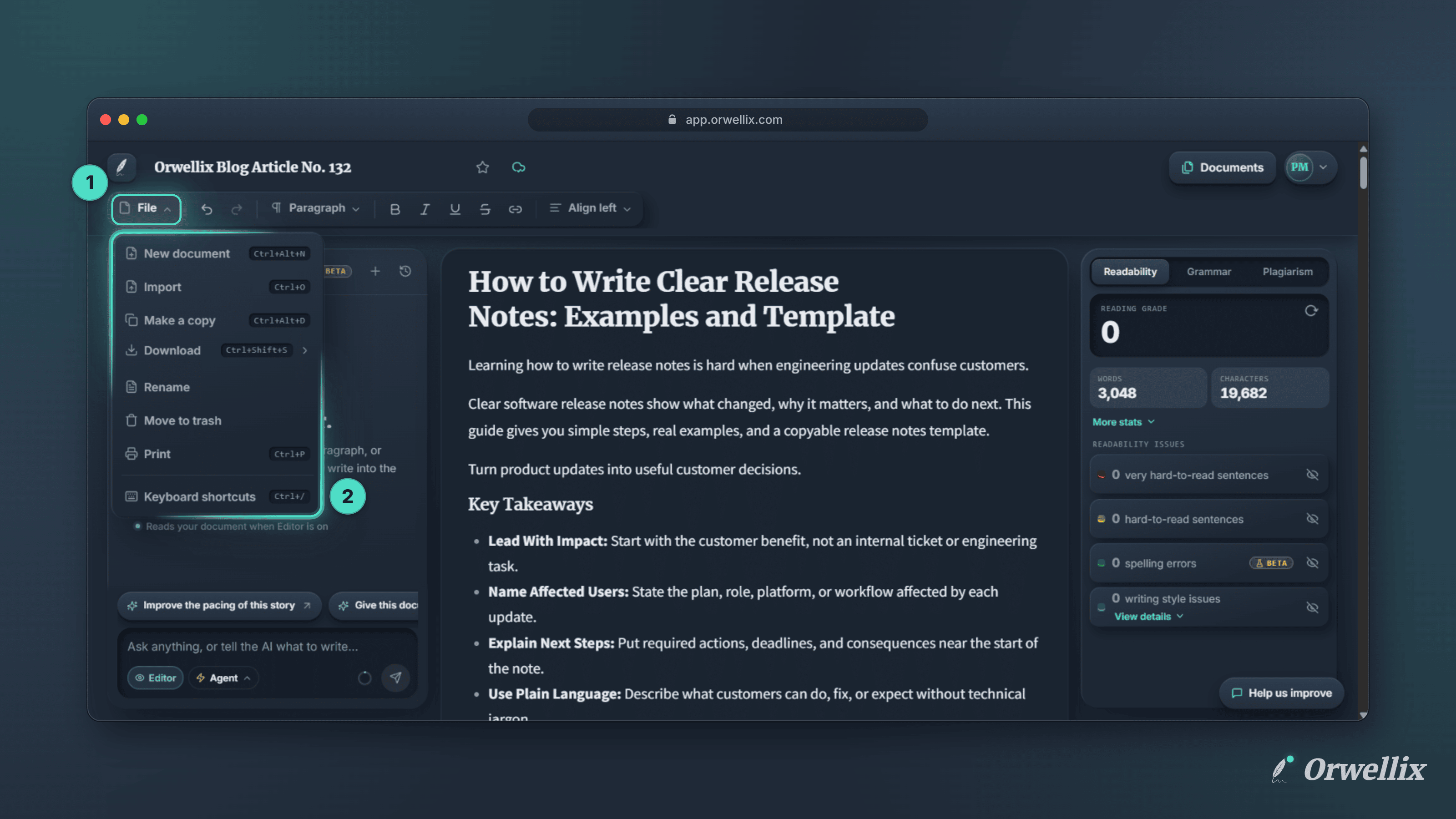
Writing is only part of working on a document. You also start new drafts, keep a copy before a big rewrite, rename things so you can find them later, and clear out what you no longer need.
The Orwellix editor now has a File menu. It’s the first button on the editor toolbar, and it holds every document action in one place.
What’s in the File Menu
| Action | What it does | Shortcut |
|---|---|---|
| New document | Creates a blank document and opens it in a new browser tab | Ctrl+Alt+N |
| Import | Brings in writing from a .docx, .txt, or .md file | Ctrl+O |
| Make a copy | Saves a copy of the document under a new name | Ctrl+Alt+D |
| Share | Lets other people view the document | |
| Download | Saves the document as Word, PDF, plain text, or Markdown | Ctrl+Shift+S |
| Rename | Puts your cursor in the title so you can type a new name | |
| Move to trash | Removes the document from your list | |
| Prints the document | Ctrl+P | |
| Keyboard shortcuts | Opens a searchable list of every shortcut | Ctrl+/ |
On a Mac, use ⌘ in place of Ctrl and ⌥ Option in place of Alt.
Start Fresh Without Losing Your Place
New document opens the blank page in a new browser tab. The document you were working on stays open in its own tab, so you can jump between the two.
Keep a Copy Before a Big Change
Make a copy asks you to name the copy first. It suggests Copy of followed by the current title, and you can change it to anything you like. The copy opens in a new tab, and the original stays exactly as it was.
This is the easiest way to try a different version of a draft. Make a copy, rewrite freely, and keep whichever version works best.
Rename in Place
Rename doesn’t open a dialog. It moves your cursor straight into the document title at the top of the editor, so you can type the new name and keep going.
Clean Up Your Documents
Move to trash asks you to confirm before anything happens. On Pro and Premium, the document goes to Trash, where you can restore it for 30 days on Pro or 60 days on Premium. After that, the document and its AI Assistant chats are deleted for good.
On the Free plan, deleted documents don’t go to Trash. The menu item reads Delete, and the confirmation makes clear that the document and its chats are removed right away and can’t be restored.
Find It Faster
The File menu is available in every document. Open any document in Orwellix and click File on the left of the toolbar to see it.