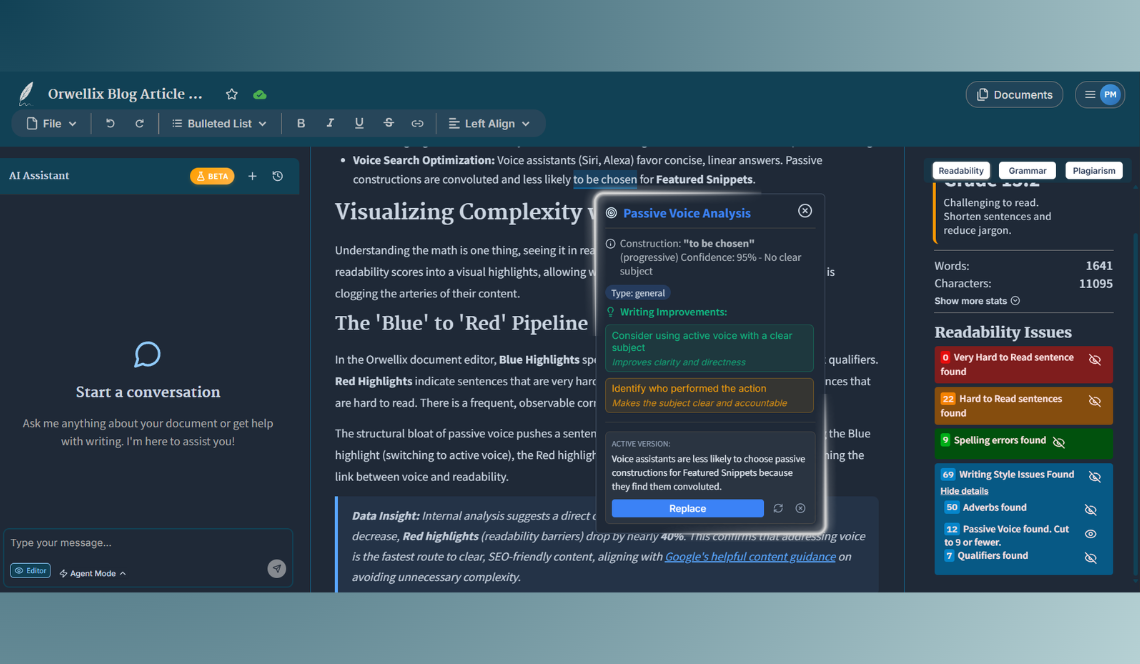
We’re excited to launch One-Click Active Voice Conversion, a powerful feature that instantly transforms weak, passive voice sentences into direct, punchy active voice with a single click. Say goodbye to the mental overhead of manual rewrites and hello to faster, more confident editing.
What’s New
-
Instant Active Voice Suggestions: Click the ”✨ Convert to Active Voice” button and watch AI instantly generate a clearer, more active version of your sentence, in less than half a second.
-
Understands Your Writing Context: The AI reads your entire paragraph to understand what you’re trying to say, ensuring every suggestion fits naturally with your surrounding sentences and maintains your intended meaning.
-
Multiple Alternatives at Your Fingertips: Don’t love the first suggestion? Click the regenerate icon to instantly generate a different variation. Keep regenerating until you find the perfect phrasing.
-
Always There When You Need It: Your suggestions stay ready for you, close the tooltip and reopen it, and your AI-generated alternative will still be waiting. No need to generate it again.
-
You’re Always in Control: Review each suggestion and decide: replace it with one click, try a different version, or keep your original. The final choice is always yours.
How to Use It
Simple 3-Step Process
- Click on Passive Voice: Orwellix highlights passive voice constructions in blue as you write. Click on the highlights to open the tooltip.
- Convert with AI: In the tooltip that appears, click the ”✨ Convert to Active Voice” button.
- Choose Your Action:
- Replace → Instantly replace your passive voice sentence with the active version.
- Refresh → Generate a new variation if you are not satisfied with the first suggestion.
- Dismiss → Ignore the suggestion and keep your original phrasing.
Real Writing Example
Before (Passive & Weak):
“The novel was written by Sarah over the course of three years, and many revisions were made before it was finally published.”
After (Active & Punchy):
“Sarah wrote the novel over three years, revising it extensively before finally publishing.”
The Result: Same meaning, but stronger, clearer, and more engaging. Readers stay hooked.
Why Writers Love This Feature
Active voice makes your writing more engaging, clear, and persuasive. But rewriting passive sentences yourself is tedious and breaks your creative flow. This feature eliminates that friction.
What You’ll Experience:
-
✅ Write 10x Faster: Stop thinking for 10-20 seconds about how to rewrite each sentence, let AI do it instantly while you stay in flow.
-
✅ Stronger, Clearer Sentences: Transform convoluted, confusing sentences into crisp, direct statements your readers can’t help but understand.
-
✅ Learn Better Writing Habits: See side-by-side comparisons of passive vs. active voice and train your brain to recognize and avoid weak constructions naturally.
-
✅ Perfect Flexibility: Not every passive sentence needs fixing. Review each suggestion and only use the ones that improve your writing.
-
✅ Never Settle: Keep regenerating until you find phrasing that matches your voice perfectly, AI gives you options, not dictates.
Real-World Writing Scenarios
Scenario 1: Fiction Author
- You’re drafting an action scene but accidentally write: “The door was kicked open by Marcus.”
- Click → Convert → Replace: “Marcus kicked the door open.”
- Result: The scene feels more immediate and exciting. Readers are pulled deeper into the action.
Scenario 2: Blog Writer
- Your draft says: “Mistakes are often made by new entrepreneurs when they’re starting out.”
- Click → Convert → Choose: “New entrepreneurs often make mistakes when starting out.”
- Result: More direct, more relatable, easier to read. Your audience stays engaged.
Scenario 3: Business Professional
- Your report states: “The proposal was rejected by the board due to budget concerns.”
- Click → Convert → Replace: “The board rejected the proposal due to budget concerns.”
- Result: Clearer communication. Your executive readers immediately understand who did what.
Perfect for Every Content Creator
Whether you’re writing novels, blog posts, social media content, academic papers, or business reports, active voice makes your ideas hit harder and stick longer. This feature helps you achieve that effortlessly.
Stop rewriting. Start creating. Let Orwellix handle the rest.