Word limits rarely apply to a whole document. An abstract has to stay under 250 words. A meta description has a character limit. One section of a grant application has its own cap.
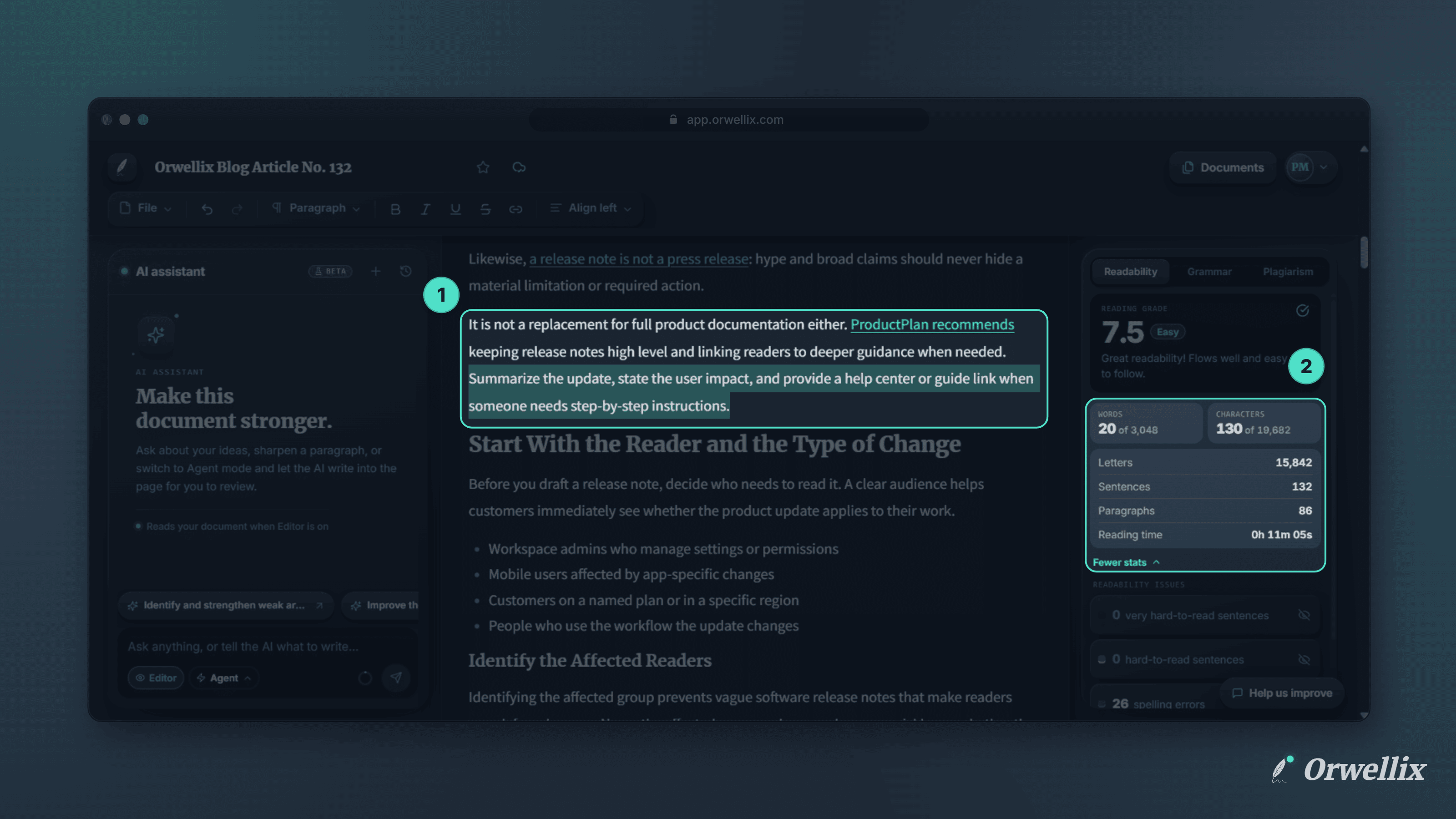
Orwellix now shows word and character counts for the text you select, right next to the totals for the whole document.
How It Works
The Readability tab in the right-hand panel shows your document’s Words and Characters at the top.
Select any text in the editor, and both numbers change to show your selection against the total. For example, 4 of 29 under Words means you’ve selected 4 of the document’s 29 words. Clear the selection and the counts go back to the whole document.
Characters include spaces, which matches how most character limits are counted.
More Stats When You Need Them
Click More stats to see:
- Letters
- Sentences
- Paragraphs
- Reading time, based on an average reading speed of 275 words per minute
These extra stats always describe the whole document. Click Fewer stats to hide them again.
Instant Updates
The counts update as you type and as you change your selection, so you can trim a section and watch it drop under the limit.
Available on Every Plan
Selection stats work on every Orwellix plan. Open a document, select a paragraph, and check the Readability tab.