The brief tab
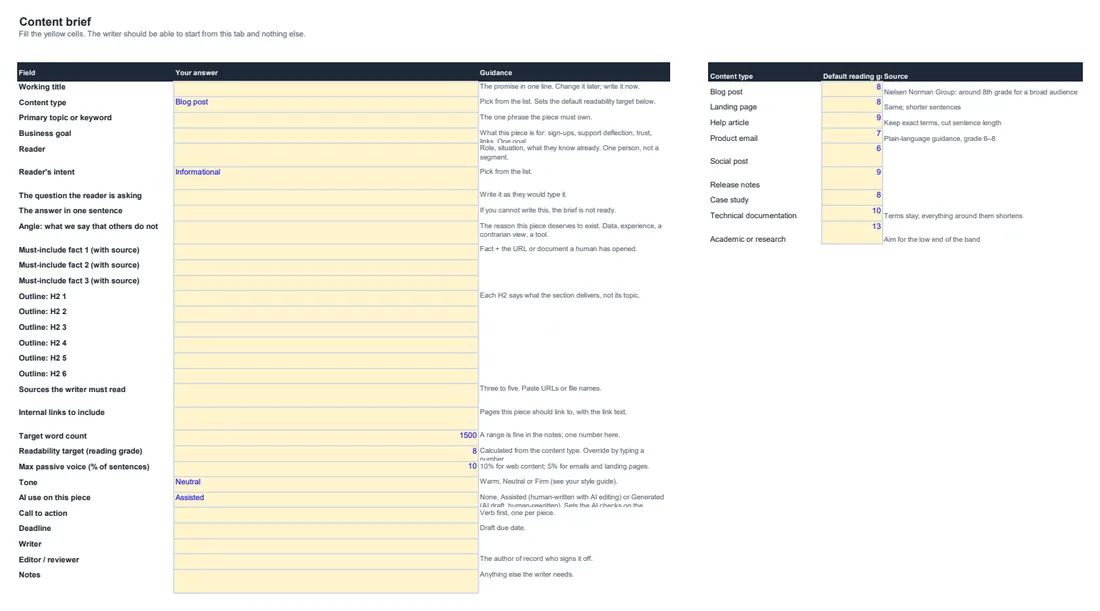
Reader, intent, the answer in one sentence, the angle, must-include facts with sources, the outline, readability target (looked up from the content type), tone, AI-use flag, CTA, deadline.
One workbook for the two moments that decide whether a piece is good: before the writer starts, and before it goes live. A brief tab with dropdowns, a 16-criterion weighted scorecard with must-pass rules, measured readability checked against the brief, an auto-calculated verdict, and a feedback tab that fills itself in.
Content marketers, editors, SEO leads and agencies managing freelancers, especially now that a large share of first drafts are machine-written.
Reader, intent, the answer in one sentence, the angle, must-include facts with sources, the outline, readability target (looked up from the content type), tone, AI-use flag, CTA, deadline.
Accuracy, answer and angle, readability, structure, originality, voice, AI check, SEO basics, CTA. Each scored 1 to 5 against a written description of what a 5 and a 1 look like.
Facts sourced, quotes real, plagiarism check passed, a named person read every sentence. Score any of these 2 or lower and the verdict is Send back, whatever the total.
Enter the measured grade level, passive-voice share and word count. The sheet checks them against the brief and tells you: meets target, close, or over.
Every criterion scored 3 or lower appears on the feedback tab with what a 5 looks like. Copy the column into your message to the writer.
A realistic blog post scored end to end, so you can see how the totals, the thresholds and the verdict behave before you use it.
Screenshots are taken from the file itself, not a mock-up. What you see here is what lands in your inbox.
It works in Excel, Google Sheets and LibreOffice. The formulas use only functions all three support; no macros.
Yes. They are yellow input cells. The totals, the percentage and the verdict adjust. The default weights add up to 100.
Any readability checker. Orwellix scores every sentence and reports both numbers in one place, with no account needed for the free checker.
Enter your name and email and it arrives in a minute. One email per new resource after that, and you can leave any time.
Prefer to skip the download? Start Orwellix free and do the editing inside the document instead.