Ten categories
Filler, qualifiers and hedges, weasel words, intensifiers, nominalizations, wordy phrases, redundancies, weak verbs, jargon, business clichés.
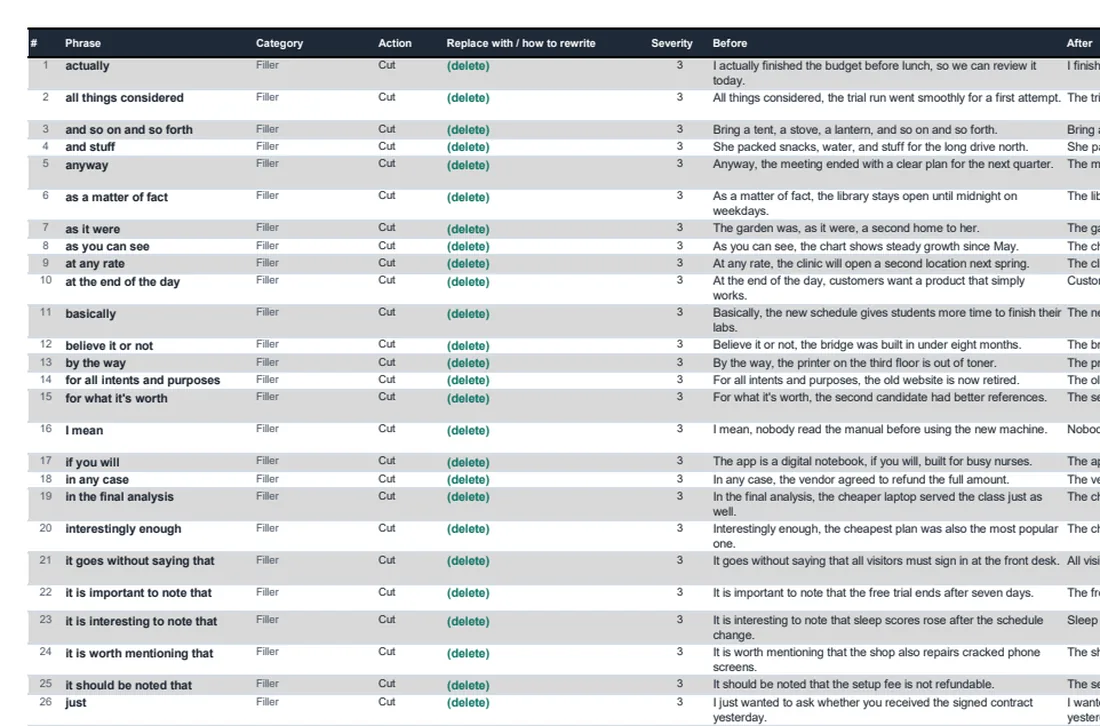
A spreadsheet, not a blog list. Every row has the phrase, its category, what to do (cut, replace or rewrite), the replacement, a severity, a before-and-after sentence, and a note on when to keep it. Plus a tab formatted for Find and Replace in Word and Google Docs.
Editors, writers, students, marketers and non-native writers who want to run a list against a draft instead of hoping to notice the fillers.
Filler, qualifiers and hedges, weasel words, intensifiers, nominalizations, wordy phrases, redundancies, weak verbs, jargon, business clichés.
Each phrase has an action. Cut means delete it. Replace gives the word. Rewrite tells you how to restructure ("name the actor", "give the number and the source").
Not "use fewer words". An actual before and after, written at grade 6 to 8, across work, school, product, health and everyday subjects.
Blanket deletion lists cause bad edits. 343 rows say when the phrase is legitimately fine: keep "significantly" when you report a statistical test.
Whole-word patterns for Word and regex for Google Docs and editors. Work through hits one by one, never Replace All.
Header filters for category, action and severity. Sort by severity to see the worst first. Add your own team's phrases in the same columns.
Screenshots are taken from the file itself, not a mock-up. What you see here is what lands in your inbox.
You will never read it top to bottom. It is a lookup and a filter: one category at a time, or one phrase you are unsure about. The severity column gets you to the 498 that almost always go.
The editor highlights fillers, qualifiers, adverbs and passive voice as you write, and the AI agent can cut or replace them in one pass while showing every change. The list is for when you are editing elsewhere, or want to know why.
Yes. Keep the same columns and the filters and counts keep working. It opens in Excel, Google Sheets and LibreOffice.
Enter your name and email and it arrives in a minute. One email per new resource after that, and you can leave any time.
Prefer to skip the download? Start Orwellix free and do the editing inside the document instead.